
After deleting some groups recently, i had the following error in AADConnect
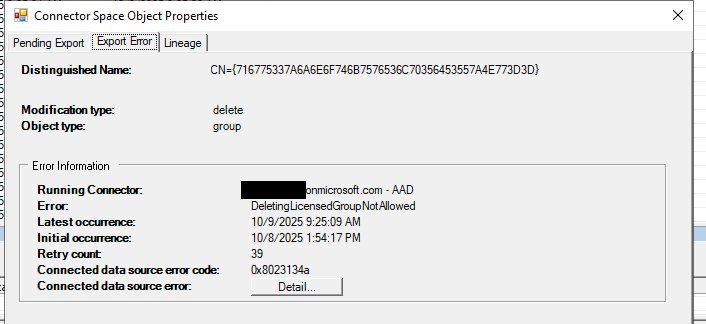
The groups i deleted were indeed licensing groups – but they were associated with our E3 licenses, which are no longer valid (we moved to e5) – and no longer show up in the portal – so, i (fairly) assumed they were good to be deleted.
First step – recovering the groups – just in case
In true MS fashion – all you get is some info that isnt immediately apparently which group it is.
In order to get the group name (assuming you AD recycle bin turned on) you can use the following to convert from hex and get the actual object
$hex = “716775337A6A6E6F746B7576536C70356453557A4E773D3D”
$bytes = for ($i=0; $i -lt $hex.Length; $i+=2) { [Convert]::ToByte($hex.Substring($i,2),16) }
$text = [System.Text.Encoding]::UTF8.GetString($bytes)
$base64 = $text
$guid = [Guid]([Convert]::FromBase64String($base64))
Get-ADObject -IncludeDeletedObjects -Filter { ObjectGUID -eq $guid } -Properties *
This will give you the name of the object – making it much easier to get back from the AD recycle bin as an interim measure.
Once you have done this, you can either force and AADSync or wait 30 mins
Open powershell and connect to mggraph
to show all groups with licenses assigned
Get-MgGroup -All -Property Id,DisplayName,AssignedLicenses | Where-Object { $_.AssignedLicenses} | Select-Object Id,DisplayName
get the groupID of the group you know isnt required anymore, and its associated sku, then
Get-MgGroup -GroupId 2e377204-5025-4ccf-86b2-41de2fcf4655 -Property “AssignedLicenses” | Select-Object -ExpandProperty AssignedLicenses | fl
To verify that it is the correct SKU, you can look up the groups with assigned licenses and display names using
Get-MgGroup -All -Property Id,DisplayName,AssignedLicenses | Where-Object { $_.AssignedLicenses} | Select-Object Id,DisplayName